Transcriber € 89,00
win+mac
Current versions are now:
4.0.7 for Windows
4.0.8 for Mac (64 bits)
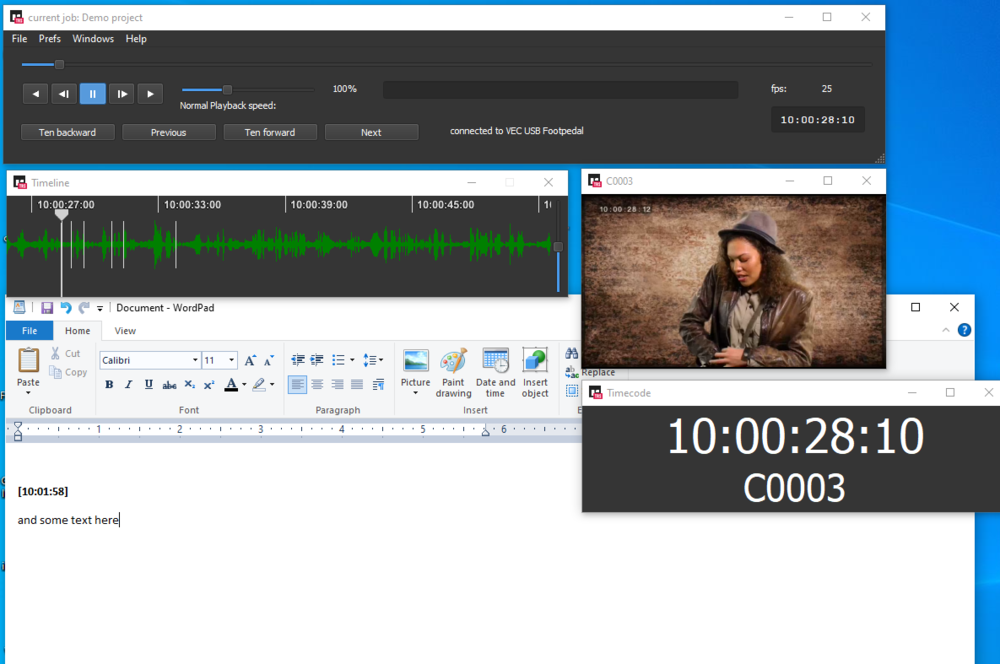
When you have to transcribe files and have the need to paste timecodes into your document, this is the application to use. Run it in the background and have full control over your files without leaving your favorite application!
Download the demo and toy with it.
Main features include
- Full JKL style keyboard control over your audio, from any application
- Send current TC (with or without additional info) to your document
- Search, highlight a TC in your document and the app. will go there with one keystroke
- Support for almost ALL audio formats
- Support for Quicktime / Mp4 / MXF / AVI Video
- Timecode support for BWF files
- Timecode support for Mp3 files (Sound Devices style)
- Timecode support for Premiere or Prelude generated files
- Timecode support for Quicktime files
- Timecode support for files that have LTC on one channel
- Timecode support for IRIG audio timecode (Trough MakeTranscriberFiles)
- Manual setting/changing for Timecode
- Video window is scalable and will remain on top of your text editor when you type
- Mini macros. You can send arrow keys, returns or even function keys to the application you're working in. (Eg it is possible to auto switch fields when you work in Excel.)
- Large TC display
- Compatible with Avid ScriptSync
- Skip silence if you don't want to sit it out
- VEC footpedal support
It can create small files from large originals, so it's easy to FTP / mail them from the client to the transcriber.
Note for Windows users:
Please run Transcriber as Administrator.
Quotes:
I’ve said it before, but I’ll say it again, you’re the best!
I love being able to refer the stable sound teams to you and your products every chance I get, I get amazing feedback from them about your products and more than that your amazing knowledge & customer service also!
Jaime Karakachos
On The Fly Transcripts, LLC
It's Official Bouke - YOU ARE A STAR!!!
Anne Miles
I'm very happy with the new version. You have a great product. Just wanted to follow up (finally) and let you know that. Thanks!
Best regards,
Denise Rohlfs
Your product has revolutionized our entire department and for that I am eternally grateful. No one works in house anymore. Everyone now works from home and I moved across the country to a place I love.
You just don't realize the impact your product has had on all of our lives, so thank you.
Katy Horton
Transcription Services Director, Western DivisionVSI HD Media
Tags
transcription, transcriber, BWF, Mp3, SoundDevices, IRIG, LTC, AAC